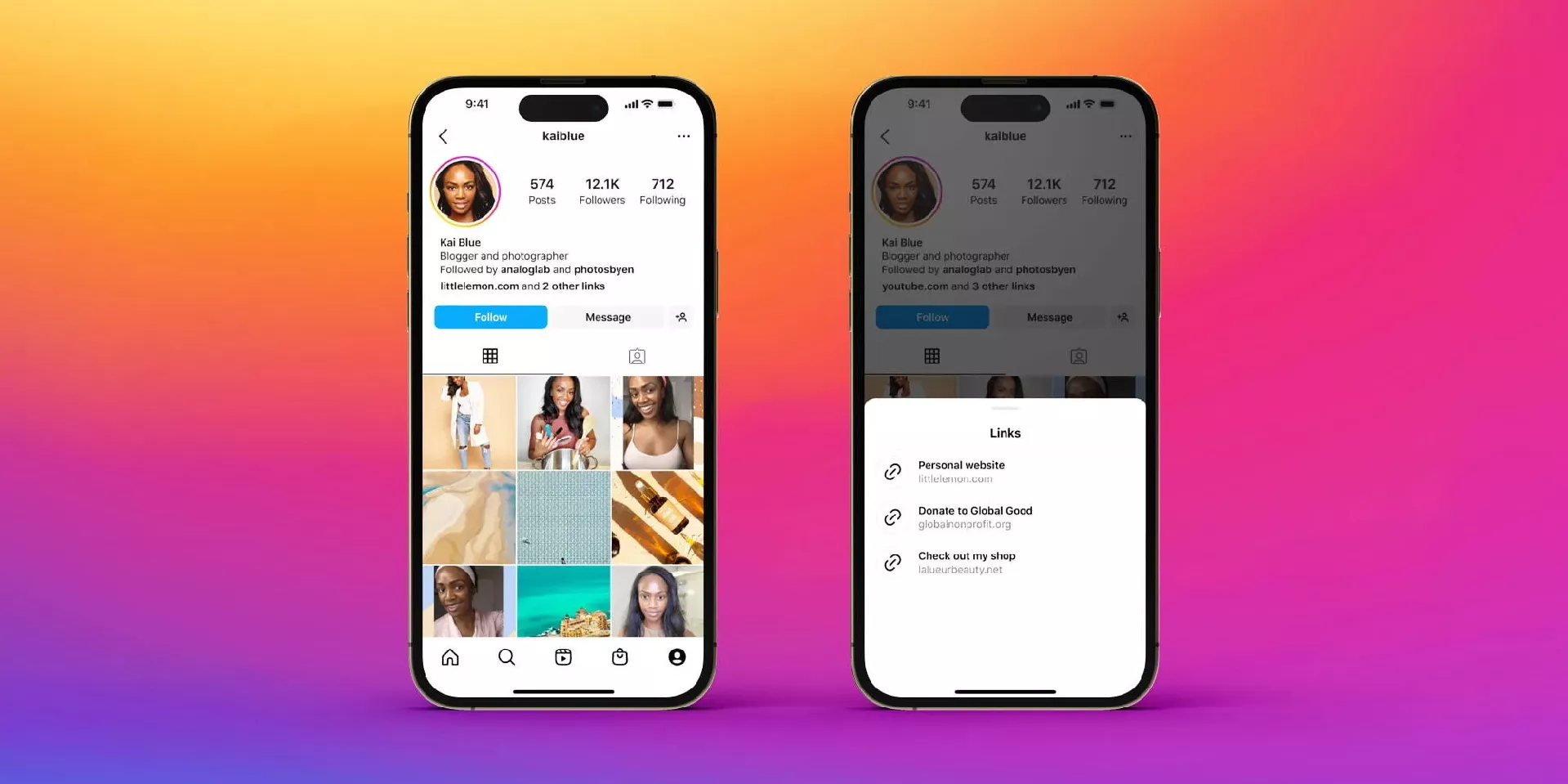
You've probably seen the phrase countless times on Instagram:
"Check the link in bio."
"Shop through the link in bio."
"Read the full article via the link in bio."
If you're new to the platform, it's natural to wonder: where is link in bio on Instagram?
The phrase sounds like a special Instagram feature, but it's actually much simpler than that. Once you know where to look, finding a bio link takes only a few seconds.
In this guide, you'll learn where the Instagram bio link is located, why creators use it so often, and how to add your own link if you're building a personal brand or business account.
Where Is the Link in Bio on Instagram?
The Instagram bio link is the clickable website URL displayed on a user's profile page.
To find it:
Open Instagram.
Visit the profile of a creator, brand, or business.
Look beneath the profile's bio description.
Tap the website link if one appears.
The link is typically located between the bio section and the user's posts.
When someone says "link in bio," they're simply asking you to visit their profile and click that website link.
While the location is easy to find once you know it, many new users overlook it because Instagram doesn't label it as a "bio link."
Why Do People Keep Saying "Link in Bio"?
Instagram is different from many other social platforms because clickable links aren't available in standard post captions.
That means creators can't simply drop a URL into a post and expect followers to visit it.
Instead, they direct people to the link on their profile.
For example, a creator promoting a new YouTube video might tell followers to watch the full version through the link in bio. A business launching a product might use the same approach to drive traffic to its online store.
As a result, "link in bio" has become one of the most common calls to action on Instagram.
What Happens When You Click a Bio Link?
The destination depends on the account.
Some creators link directly to their websites, while others send visitors to a landing page containing multiple resources.
A bio link might lead to:
An online store
A blog post
A newsletter signup page
A YouTube channel
A podcast
A booking form
A portfolio website
A digital product
For businesses and creators, this profile link often acts as the main bridge between Instagram and the rest of their online presence.
How to Add a Link to Your Instagram Bio
Adding a bio link is straightforward.
Go to your Instagram profile and tap Edit Profile. From there, select Links and add the URL you want visitors to access.
Once saved, the link will appear publicly on your profile.
This allows followers to move directly from Instagram to your website, store, or any other destination you choose.
Why Many Creators Use Link-in-Bio Tools
As audiences grow, one link often isn't enough.
A creator may want followers to read a blog post, subscribe to a newsletter, watch a video, and browse products at the same time. Continuously changing the profile link can become frustrating.
That's why many creators use link-in-bio tools.
These platforms create a dedicated landing page that houses multiple destinations behind a single Instagram link. Instead of forcing followers to choose between different URLs, everything is organized in one place.
For example, tools like Biovelt allow creators to showcase content, products, social profiles, and other resources through a single customizable page, making navigation simpler for visitors.
Why Can't I Find the Link in Someone's Bio?
If you're looking for a bio link and don't see one, there are a few possible reasons.
The account owner may not have added a website yet. Some personal accounts simply don't use the feature.
It's also possible that the account recently removed or changed its link. Creators frequently update their bio links to support new campaigns, products, or content.
In some cases, users may direct traffic through Instagram Stories instead of their profile.
How to Get More Clicks on Your Bio Link
If you're using Instagram to grow an audience or business, simply having a bio link isn't enough.
The most successful creators give followers a compelling reason to click.
Instead of saying "link in bio," explain the value visitors will receive:
Download the free guide.
Get the complete tutorial.
Access the exclusive discount.
Read the full case study.
The clearer the benefit, the higher the likelihood that followers will take action.
Final Thoughts
If you've been searching where is link in bio on Instagram, the answer is simple: it's the clickable website link located on a user's profile page, directly below the bio description and above their content feed.
Although it's a small part of an Instagram profile, it's one of the platform's most powerful traffic-driving tools. Whether you're following your favorite creator, promoting a business, or building your own audience, understanding how the bio link works can help you get more value from every profile visit.
pred 9 urami